Table of Contents
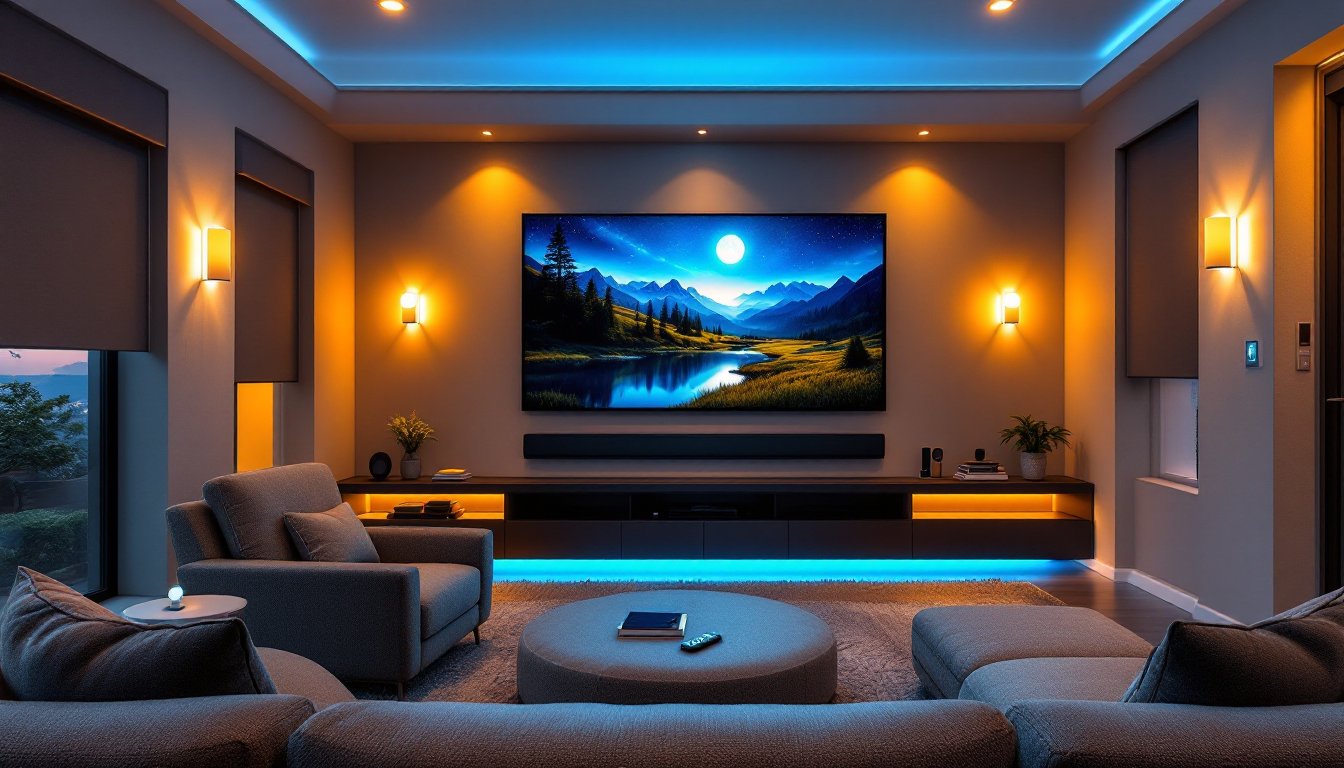
ToggleSetting up a dedicated movie space used to mean installing a projector, running speaker wires, and hoping the lights dimmed on command. Today, a smart home movie setup transforms that room into an intelligent, responsive environment where everything syncs automatically. From voice commands that start the film to lighting that fades to black as the opening credits roll, smart home automation elevates the viewing experience beyond simple entertainment. Whether upgrading a basement theater or turning a spare bedroom into a cinema, understanding the core devices and automation strategies makes the difference between a mediocre installation and a setup that feels truly next-level.
Key Takeaways
- A smart home movie setup uses a central hub (Alexa, Google Home, or Apple Home) to automatically control lighting, audio, video, and climate with a single voice command or button press.
- Smart lighting with color-changing bulbs and motorized blinds are the most transformative elements, creating mood ambiance while eliminating glare that degrades screen quality.
- A dedicated streaming device like Apple TV 4K paired with an ARC/eARC soundbar provides deep voice assistant integration, enabling full automation without separate speaker wires.
- Creating automation sequences or ‘scenes’ is where a smart home movie experience becomes practical—test them across different lighting conditions to ensure consistent performance throughout the day.
- Budget-friendly smart movie setups can begin with essentials (smart TV, soundbar, and smartphone app), then expand gradually with smart bulbs and dimmer switches rather than expensive motorized blinds.
- Investing in a dedicated home automation hub improves reliability, ensuring automations work even if WiFi momentarily drops during your smart home movie experience.
What Is a Smart Home Movie Setup?
A smart home movie setup integrates entertainment devices with home automation technology, allowing a single voice command or button press to control lighting, audio, video, and climate simultaneously. Unlike traditional home theaters that rely on multiple remotes and manual adjustments, a smart movie environment uses a central hub, usually a smart speaker, home automation system, or dedicated app, to orchestrate the entire experience.
This means when someone presses “Movie Mode,” the lights dim to a preset brightness, the TV or projector powers on, the soundbar unmutes, and the doors lock automatically. Temperature drops slightly to keep the room cool during a long film. All of this happens without lifting a finger after that initial command.
The backbone of a smart home movie setup is a reliable WiFi network and a central hub (Amazon Alexa, Google Home, Apple Home, or Samsung SmartThings). These platforms communicate with individual devices, allowing them to work in harmony. Most modern entertainment devices, TVs, soundbars, streaming boxes, connect directly to these ecosystems, making integration straightforward for homeowners willing to spend a weekend setting things up properly.
Essential Smart Devices for Your Home Theater
Lighting and Ambiance Control
Smart lighting is the most transformative element of any automated movie room. Color-changing smart bulbs (typically 16 million color options) let homeowners create mood lighting far beyond simple on-off switches. Philips Hue and LIFX are industry standards: both offer reliable dimming, color presets, and scene scheduling.
When setting up movie lighting, consider installing smart bulbs in ceiling fixtures and wall sconces, but skip the ultra-bright overhead lights entirely. Instead, place warm white dimmers at 10–20% brightness along the back or sides of the room for safe navigation without glare on screens. Many users program a “Movie Mode” scene that sets all lights to a specific warm tone and brightness level automatically.
Smart blinds and shades (motorized roller shades with automation integration) block natural light reliably, which a basic blackout curtain cannot always guarantee. Lutron, Somfy, and budget-friendly alternatives like Eve MotionBlinds retrofit existing blinds with smart motors. This step is non-negotiable for daytime movie watching: glare on screens ruins even the best image quality.
Wall-mounted smart dimmer switches replace standard switches and let users control lights without adding smart bulbs to every fixture. This is a cost-effective middle ground for rooms where full smart bulb installation isn’t practical.
Audio and Visual Equipment Integration
The TV or projector is the visual centerpiece, but smart integration means the device works within an automated ecosystem. 4K Smart TVs from Samsung, LG, and Sony now include built-in voice assistants and WiFi connectivity, eliminating the need for a separate streaming device. A 4K projector (around 1,000–3,000 lumens for a dedicated dark room) paired with a motorized projection screen offers flexibility for those wanting a true cinema feel.
But, most smart home movie setups benefit from a dedicated streaming device, an Apple TV 4K, Roku Ultra, or Amazon Fire TV Cube, because these boxes integrate deeply with voice assistants and smart home hubs, enabling full automation. An Apple TV 4K, for instance, acts as a HomeKit hub, controlling lights and locks alongside entertainment playback.
Audio integration is where smart homes truly shine. A soundbar with ARC/eARC input (Audio Return Channel) eliminates the need for separate speaker wires running to the TV: the HDMI connection handles both video and sound. Brands like Sonos Arc, Samsung HW-Q70T, and Bose Smart Soundbar 600 integrate directly with voice assistants, allowing commands like “Play movie audio” to adjust volume and channel settings automatically.
For surround sound beyond a soundbar, smart wireless speakers (Sonos, Apple AirPlay 2 compatible devices) placed at the rear or sides expand the soundfield. Many integrate with home automation systems, adjusting volume based on room occupancy or time of day. WiFi-based surround speakers eliminate the cable-running mess of traditional setups.
Creating the Perfect Automated Movie Experience
Building automation sequences, called “scenes” or “automations” depending on the platform, is where a smart home movie setup becomes genuinely practical. Start by identifying the devices in the room: lights, blinds, TV, soundbar, and possibly a lock or thermostat.
On Amazon Alexa, navigate to the Routines section and create a “Movie Mode” routine. Add actions in sequence: dim lights to 15%, close blinds, turn on the TV, unmute the soundbar, and adjust thermostat to 68°F. Save the routine and trigger it with a voice command (“Alexa, movie time”) or physical button press. Google Home uses a similar “Routines” feature: Apple Home calls them “Scenes.”
For streamlined setup, invest in a dedicated home automation hub. An Apple TV 4K, Amazon Echo Show, or Samsung SmartThings Hub acts as the brain, sending commands to devices even if the WiFi momentarily drops. Without a hub, some automations fail if the smartphone initiates them but then loses signal.
Wire management matters in a smart movie room as much as in a traditional one. Run HDMI cables in conduit to the TV, group power cords behind wall-mounted shelving, and use a smart power strip that turns on the soundbar, lights, and other devices simultaneously when activated. Devices like the Lutron Caseta Smart Dimmer or Nanoleaf Lines add visual feedback, subtle lighting under shelves or behind the TV, that enhances the cinematic mood without distraction.
Timing is critical. Test automations during different lighting conditions and times of day. An automation that works perfectly at night might fail in bright daylight if blinds don’t fully close or if glare still reaches the screen. Adjust brightness and color settings iteratively until the room feels consistently optimized.
Budget-Friendly Smart Home Movie Solutions
Not every homeowner has $5,000–$10,000 for a fully automated theater. Smart movie setups can start small and expand over time, making them accessible to DIY enthusiasts on tighter budgets.
Begin with the essentials: a smart TV or streaming device (Apple TV 4K at ~$130, or a $50 Chromecast for basic voice control) and a quality soundbar (Sonos Beam Gen 2 at ~$400, or Bose Smart Soundbar 600 at ~$600). These two devices handle 80% of the movie-watching experience without fancy lighting or motorized blinds.
Add smart lighting gradually. Start with 2–3 color-changing smart bulbs in the most visible fixtures, rather than replacing every light at once. A single smart dimmer switch for the main overhead light costs $40–$80 and provides manual control while you build out the automation. Bulk purchases during sales (Black Friday offers 20–30% discounts on smart devices) reduce costs significantly.
Skip motorized blinds initially: heavy blackout curtains ($30–$80 per window) accomplish the same darkness requirement without the cost or installation complexity. Once the rest of the setup is stable, add motorized shades as a later upgrade.
For the central hub, start with a device most households already own: a smartphone and a free app (Alexa, Google Home, Apple Home). As the setup grows, invest in a dedicated hub ($50–$150) to improve reliability and automation responsiveness.
Conclusion
A smart home movie setup doesn’t require professional installation or a mansion-sized budget. By starting with core devices, a quality streaming solution, soundbar, and central hub, homeowners can build a responsive, enjoyable theater experience that grows with their needs. Automation sequences turn manual adjustments into single-command simplicity. Whether watching films, gaming, or streaming sports, smart home devices tips and careful planning ensure every viewing feels premium and effortless.